AI Workers: an automated reviewer in your FlexiCapture workflow that checks and corrects documents before a person has to
An AI Worker is a stage you add to a FlexiCapture project between recognition and human Verification. For each document it sends the extracted fields and the page text to WiseAI Council, which compares every value with what is printed on the page and proposes actions. The stage re-checks each proposal locally and applies only what has evidence on the page. Anything the worker is unsure about goes to a person exactly as before.
Three modes, so you can start safely: shadow only logs and writes a note, suggest records proposals, apply changes field values. The mode that runs is the lowest of the platform setting, the ceiling you set in FlexiCapture and the mode saved on the worker, so no single setting can push a worker further than the others allow.
Manage workers in the dashboard under AI Workers > Workers: name, instructions and allowed actions, drafts that you publish with a change note, version history with rollback, a decision log, and pause or archive. A new worker starts a 7-day free trial and responses say 'AI Worker Test Mode: X days remaining'. After that you hire it for $499 per month from your prepaid balance (invoiced accounts: on the invoice), renewing automatically until you turn that off. A trial that ends without hiring is never charged.
Every run leaves a readable trail: one line per event in the AIWorker.History registration parameter, appended and never overwritten, and an 'AI Worker's Notes' field on the document with the notes of every run. A document that is reprocessed is reviewed again in full.
Fail-open and a kill switch: if the Council cannot be reached or answers badly, the document passes on unchanged. Setting AI_Worker_Enabled to No stops the worker for the whole project with no restart. AI Workers > Remove an AI Worker walks you through taking one out of FlexiCapture.
Walkthrough: from first look to a working AI Worker
1Read AI Workers > How it works. It explains what the worker will and will not do, the three modes and the evidence rules.
2Open AI Workers > Workers and add a worker. Give it a name, instructions for your documents and the actions it may take. The 7-day free trial starts now.
3Open AI Workers > How to add. Download the two library files, check their checksums, then follow the numbered FlexiCapture steps: project references, the notes field on the Document Definition, the script stage before Verification and the entry condition on Verification. The Deployer tool (see the next entry) automates the parts FlexiCapture's admin tools can reach.
4Run in shadow mode first. Open a processed document and read AIWorker.History and the AI Worker's Notes field to see what the worker would have done.
5When the results earn it, raise the mode to suggest, then apply. Hire the worker before the trial ends so it keeps processing.
6To pause, set AI_Worker_Enabled to No. To remove, follow AI Workers > Remove an AI Worker.
v1.10401.261105
The AI Worker Deployer: a Windows tool that installs, checks, enables and turns off an AI Worker for FlexiCapture and ABBYY Vantage
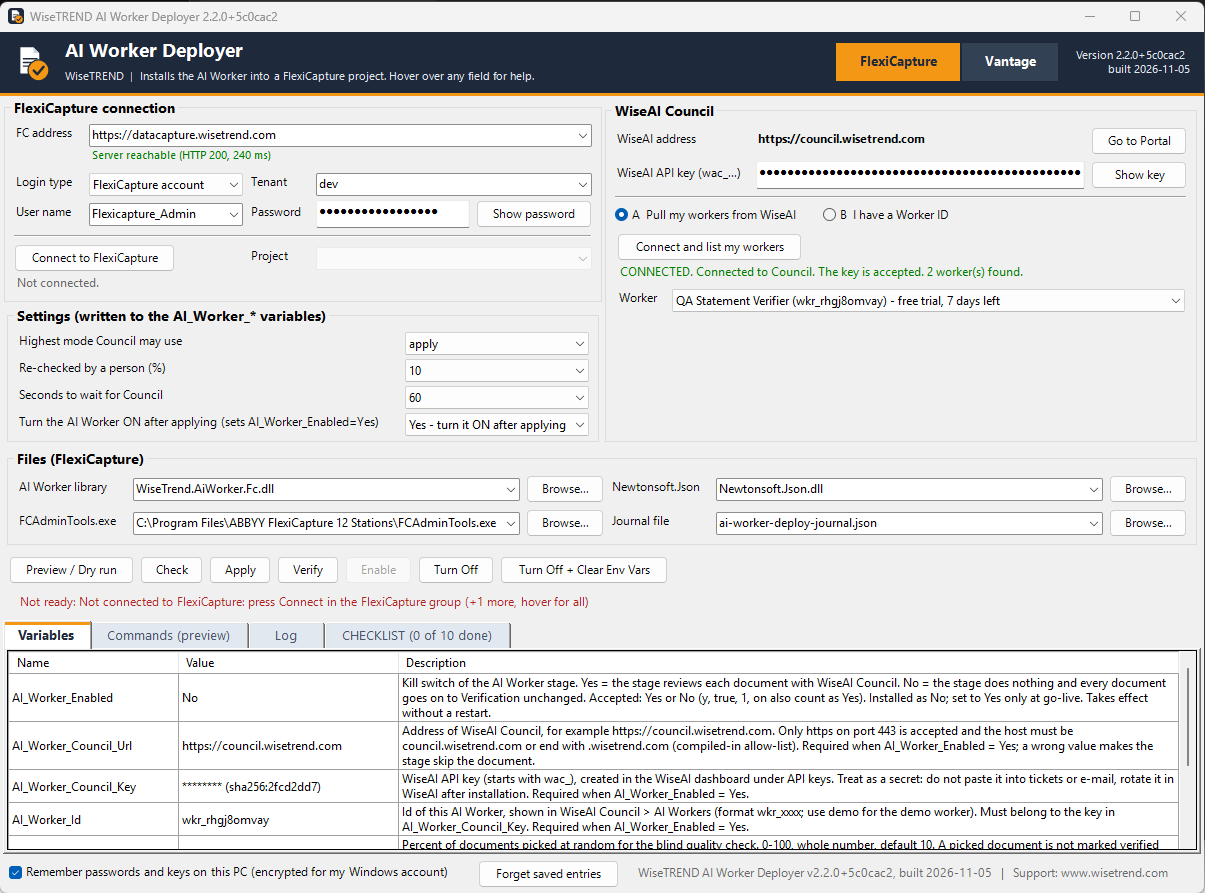
One window instead of a page of manual steps: enter your FlexiCapture server, sign in, connect to WiseAI Council with your API key, pick the worker from the list of your workers (its trial days show beside its name) and press Apply. The Variables tab lists every AI_Worker_* variable with its value and a plain description before anything is written, and the Commands tab previews each command.
Safe by design: Preview / Dry run changes nothing, Check validates the setup, and the worker stays off until you press Enable. Enable stays disabled until the CHECKLIST tab shows every step done, and each tick reflects what the Deployer actually found, not what you clicked.
A CHECKLIST for the steps FlexiCapture's admin tools cannot do (first library reference, Document Definition field, stages, entry conditions), with the exact text to paste. Settings cover the highest mode the Council may use, the share of released documents re-checked by a person, and the time to wait for the Council.
Turn Off sets the kill switch. Turn Off + Clear Env Vars also blanks every AI_Worker_* variable. Neither needs a saved journal file, so you can run them from another PC or another folder.
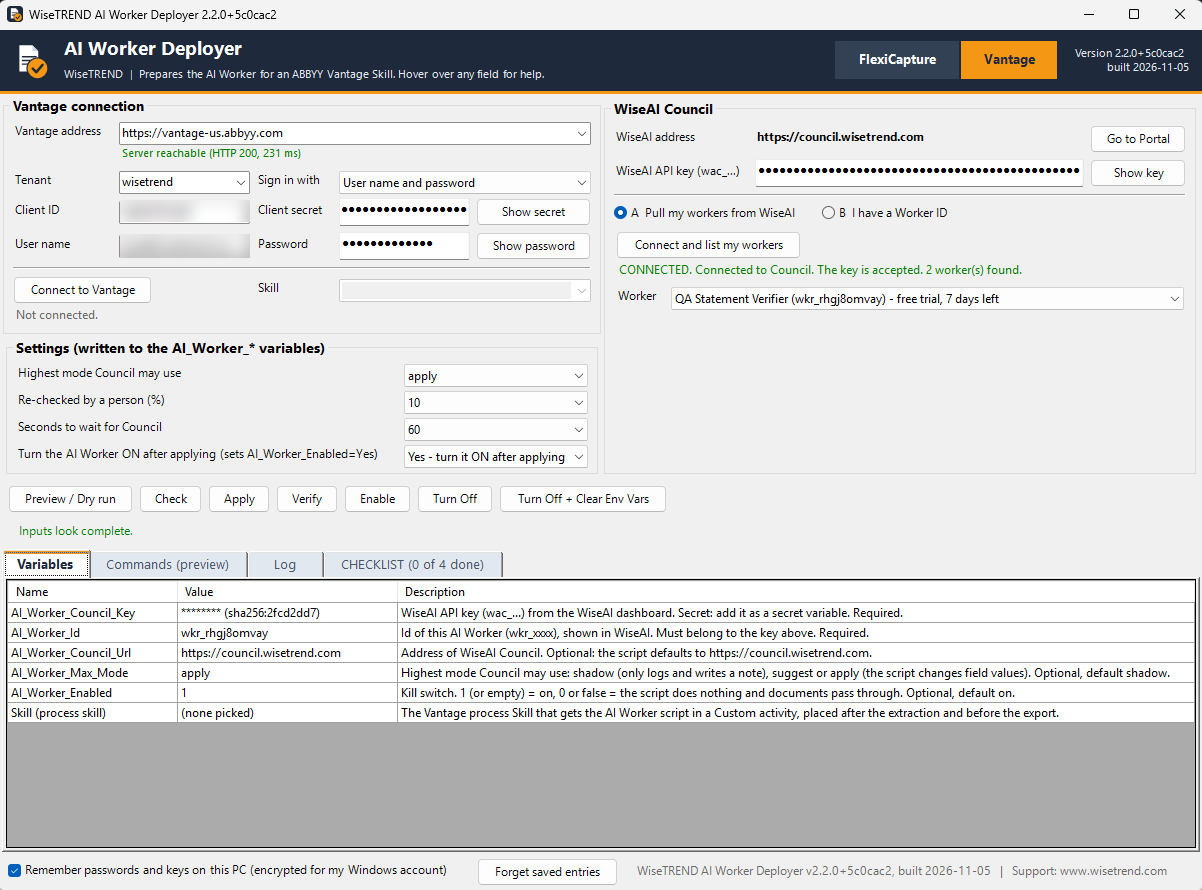
A Vantage tab connects to your ABBYY Vantage tenant, lists your Skills and tracks the setup checklist for the Skill that runs the AI Worker script. Vantage setup is newer than FlexiCapture and has had less use in the field.
The Deployer is part of the AI Worker kit. To get it, contact WiseTREND through www.wisetrend.com.
FlexiCapture tab: connect, choose the worker, set the mode, then Check, Apply, Verify and Enable.Vantage tab: the same flow for an ABBYY Vantage Skill.
v1.7124.261013
An OpenAI-compatible API, WiseAI Council as a model inside DocAI Fabric, and the same JSON for synchronous and asynchronous results
Use the Council from any OpenAI-compatible tool: point an OpenAI SDK (Python, Node, C#) or any tool that lets you add an OpenAI-compatible model at the Council and sign in with your normal Council API key. Five model ids pick the way of working - wiseai-council, wiseai-council-solo, wiseai-council-panel, wiseai-council-debate and wiseai-council-fast - with page images, tool calling and real streaming. Same keys, security scanning, metering and billing as the REST API; every call shows on Activity with its cost, and the cost of each call is also returned in a response header. Copy-ready samples are in Connect > OpenAI-compatible.
Structured JSON in your own schema through the same endpoint: ask for a json_object or json_schema response and three model families answer, every field is voted, and disputed fields go to a tie-break model. You get one JSON in your exact shape, with any dissent reported beside the answer, never inside it.
WiseAI Council inside DocAI Fabric: register the Council as a model (Integrate > Models > Add model) and use it for split, classify, extract, redact and the assistant. Verified end to end on a live DocAI Fabric tenant, with every DocAI Test check passing. The new Connect > DocAI Fabric page lists every field of the Add model form in order, the two settings that make the Test fail, which model id to use for each DocAI task, expected Test results, cost, troubleshooting and a downloadable settings file.
The same JSON for sync and async: a request sent with sync: true now returns the finished result in exactly the same shape as GET /v1/requests/{id}, so an integration can switch between sync and async without changing its parser. The old nested result is still included as a deprecated alias, so existing integrations keep working, and asynchronous submissions are unchanged. All Connect samples are updated.
v1.7049.261012
DCN reference ids, one-click drill-down from usage to the requests behind it, follow-ups answered in a single call, and every Council prompt published in Connect
DCN (Document Control Number): send dcn with any request to tie it to your own document or transaction id - a FlexiCapture document, a Vantage transaction, a claim or order number. Many requests can share one, follow-ups inherit it, and GET /v1/requests?dcn=... lists every request for it. The memo stays as the second, larger free-text field.
Drill down from Usage & charges: every number in the By API key table opens Activity filtered to that key and month. Activity now filters by key, status and DCN, shows a DCN column, and the CSV download follows the filters.
Follow-ups in one call: send sync: true on a follow-up and the answer comes back in the same response, exactly like a first request. Use it for short questions on a single document; keep complex ones asynchronous. The Connect samples for C#, Python, Node, curl, FlexiCapture and Vantage now show both ways.
Prompts tab in Connect: the system prompts and templates the Council uses for every task type (T1 to T9) and every method - panel vote, debate, draft-critique-revise, map-reduce and field extraction - generated from the live code, with a guide to getting JSON in your own schema for complex document definitions.
Easier navigation: the tabs of each page (Usage & charges, Connect, Prompt Library, Data protection) are listed under it in the left menu.
Fewer false alarms: long numeric ids such as 16-digit claim or transaction numbers are no longer mistaken for card numbers by the data-protection check.
v1.6784.261011
Saved prompts, follow-up questions on a finished request, an API that queues your requests while WiseAI is being updated, and step-by-step integration guides
Prompt Library: save a task and its settings once and call it by id with just your input. Anything you also send overrides the saved value, every change keeps a version, and a call can pin a version (id@3). Manage prompts in the new Prompt Library page, from Try it, over the API (/v1/prompts) or through MCP.
Follow-ups: ask another question about a request you already ran, or try a different instruction on the same document. No re-upload. The first follow-up on a request sent without options.followUps writes the provider cache (Anthropic: about 1.25x input on the carried context for that turn); follow-ups within about 5 minutes of a cached turn read it at about 10%; later ones pay the full input price. Send options.followUps:true on the original request if you plan quick follow-ups. A request stays open for follow-ups until its retention ends (by default 30 days, 7 for PHI).
Always-available API: while WiseAI is being updated, new requests are accepted and answered 202 queued with an id instead of an error, then run in the order they arrived as soon as the update finishes. A queued request that cannot run within 24 hours ends as expired and is never charged.
Connect guides for ABBYY FlexiCapture, ABBYY Vantage and any third-party system: numbered steps, copy-ready code personalised with your key prefix, saved prompt and callback, and downloadable samples for C#, Python, Node, PowerShell, n8n and Power Automate.
API keys show who created them, by name, on the API keys page.
v1.4297.260924
WiseAI Council is now publicly available: one reviewed answer from a council of AI models, with compliance, cost control and a full audit trail built in
Open to every organisation: sign in with your WiseTREND One Portal account at my.wisetrend.com/wiseai, start with $10 of free credit and get a first result from the Try it page in minutes - no code, no sales call.
Answers you can defend: several models from different vendors vote, debate or critique each other before you see one answer, and any disagreement comes back as a written dissent instead of being hidden. On documents, fields the models disagree on are flagged for a person rather than guessed.
Built for regulated data: choose standard, PII, confidential or PHI per request. PHI runs only on Microsoft Azure OpenAI under Microsoft's Business Associate Agreement, the Compliance Gate and the Sentinel security agent check every request and answer, and the BAA and DPA can be reviewed and signed online on the Data protection page.
Documents in, structured data out: attach whole PDFs, scans, Office files or e-mails and get every field back as data, located on the page, with purpose-built recognition for CMS-1500, UB-04, ADA Dental claims and ACORD 25 certificates.
Cost you control: prepaid credit by card (or bank transfer and monthly invoice through billing@wisetrend.com), daily and monthly spending ceilings, an account limit, and the charge for every request on Usage & charges.
Plug it in anywhere: a REST API with named keys and callbacks, an MCP server for AI agents and tools, copy-ready requests from Try it, and Configuration for organisation memory, retention and data location, with Team roles for your colleagues.
Hardened for public use: fair queuing and rate limits between customers, stricter document checks, security headers throughout, and a clean retry signal during maintenance.
v1.4076.260923
WiseAI Council is here: a multi-AI council of specialists that reviews, cross-checks and agrees before you get one answer
Get one reviewed answer instead of a single model's guess - every request can run through multiple AI specialists (Anthropic Claude, OpenAI, Azure OpenAI, and xAI Grok through Microsoft Azure AI Foundry) in Solo, Panel-vote, Debate, or Draft-Critique-Revise mode, with a built-in Devil's Advocate and Reviewer.
Send PHI with confidence - PHI requests run only on Microsoft Azure (Azure OpenAI) under Microsoft's Business Associate Agreement, and a Compliance Gate blocks any PHI request from ever reaching any other provider.
A dedicated security agent, Sentinel, scans every request in and out for PHI, PII, secrets and cross-tenant leaks, on top of checking the model's own answer.
Purpose-built recognition for CMS-1500, UB-04 and ADA Dental healthcare claims and ACORD 25 certificates of insurance, so structured fields extract accurately instead of relying on a generic prompt.
The Council improves itself: a learning engine scores every outcome and shifts routing toward whichever model and provider perform best for each type of request, tested safely in shadow mode before it goes live.
Sign up and see usage and charges in real time from your own dashboard - prepaid billing with a starting credit, self-serve budget caps, and BAA/DPA agreements you can review and sign online.
Call it your way: REST API, an in-browser Playground, or an MCP server for tools like FlexiCapture.
Zero-surprise maintenance: during a brief update window your integration gets a clean retry signal instead of a dropped connection.
Coming up
Google Gemini models as additional Council specialists.
EU and Australia (ANZ) data regions, listed as Coming soon under Configuration.